Hippo is a personal CRM built for Apple platforms. Keep notes, events, and to-dos for the friends, family, and colleagues you care about — all stored on your device. No account. No cloud server. No Contacts permission required.
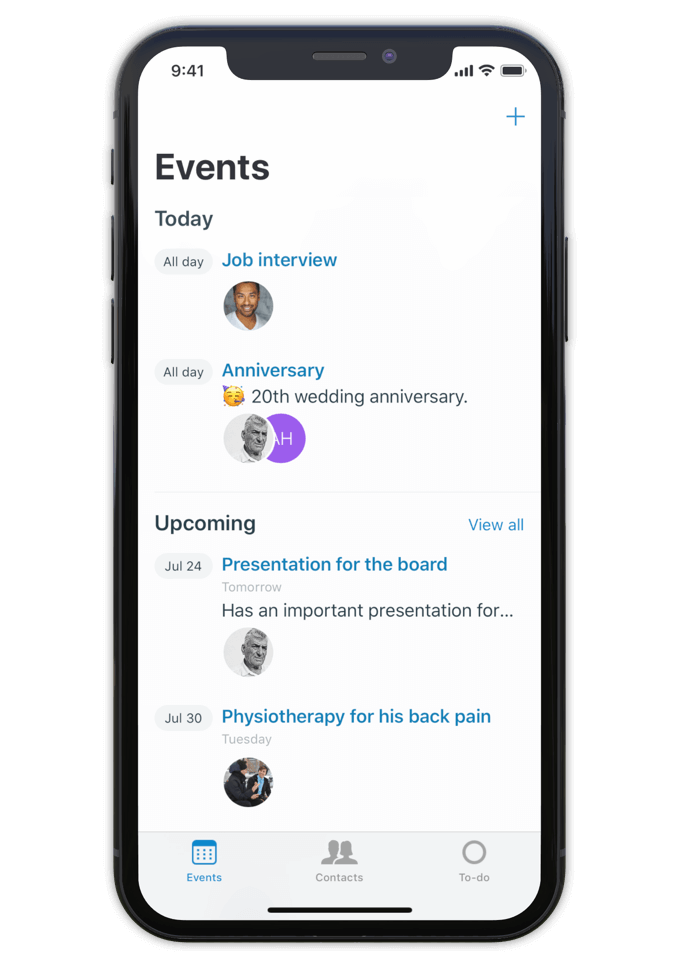
Hippo is a personal CRM for iPhone, iPad, and Mac. A personal CRM helps you keep track of the people in your life the way a sales CRM helps a salesperson track leads — but focused on the relationships that actually matter to you. Friends, family, mentors, colleagues, the people you want to stay close to.
Unlike most personal CRMs, Hippo stores everything on your device. There’s no account to sign up for, no server holding your contacts, and access to your iOS Contacts list is never required (it’s optional, and granted contacts still stay on-device). Optional sync runs through your own private iCloud Drive — never through Hippo.
Hippo is built for people who want to be more attentive without trading their privacy for the privilege.
Make notes, keep track of events and store to-dos for all your contacts.
So next time you meet, a quick glance at the person's profile in Hippo is all you need to remember the details.
Being attentive doesn’t have to be a challenge anymore.
Hippo is your personal reminder.

Use notes to quickly jot down things you learned about your contacts. Like names of kids, new jobs, a promotion, holiday plans, or gift ideas.
Create events for face to face meetings or important life events.
Get reminded when the event is happening so you can ask about it.
Remember the questions you want to ask the next time you meet.
Hippo is the personal CRM that doesn’t want your data.

Monica is a powerful open-source personal CRM, but it’s web-based and requires either a paid hosted plan or self-hosting your own server. Monica’s recent v5 update has shifted the product toward life journaling and modular vaults. If you want a focused personal CRM that runs natively on iPhone, iPad, and Mac with no setup, Hippo is the closer fit.
Dex is a strong choice if your relationships are heavily LinkedIn-driven and you want cross-platform sync via a Dex account. Hippo runs natively on Apple platforms (iPhone, iPad, and Mac) and is built around on-device privacy — your contact data never leaves your device unless you choose to sync via iCloud.
Clay enriches your contacts with public data from across the web. Hippo intentionally doesn’t do this. If you want enrichment, Clay is the right tool. If you want your data to stay local and untouched, Hippo is.
Hippo offers a one-time lifetime purchase option (uncommon in the category) and is the only one that works without ever requesting your iOS Contacts list.

Hi 👋, I’m Roel
I have been struggling with my memory all the time, at work and at home. I used to forget children’s names, someone's job, birthdays, anniversaries and other important life events. At work I couldn’t remember when or how a decision was made.
This made me insecure and unhappy. That is why I built Hippo.
With the Hippo app, I can remember all the important things about the persons I care for. A quick note usually does the job. It is simple and effective … and has changed my life! Hippo has helped me to become a better friend, partner and colleague.
Hippo is free to try for 1 month. After the trial, it’s $14.99 per year or $29.99 as a one-time lifetime purchase.
To view the pricing in your currency, see Hippo in the App Store.

Free to try for one month.
Most Andowl cameras come with a basic viewing application (often called AmCap, PC Camera, or Vimicro).
Summary: If you are on Windows 10/11, plug it in first. If it works, you don't need to download anything. If it doesn't, use the Hardware ID method in Device Manager to find the exact driver match.
Possibly, but not with a standard driver. You need an OTG adapter and a UVC viewer app like "USB Camera" (by Shenzhen Dongxing). The snapshot button and LED controls will likely not work.
If you cannot find the file on the Andowl site, you can identify the internal chipset to find a compatible driver:
If you have downloaded a driver file, follow these steps to install it correctly:
Andowl Q-500 is a wireless USB Wi-Fi adapter designed to provide wireless internet connectivity to PCs and laptops. It is often a "Plug and Play" device, meaning modern operating systems should recognize it automatically. tech4u.co.za Driver and Installation
If your computer does not automatically detect the adapter, you can manage the installation using these methods: Standard OS Compatibility : The device supports Windows (XP/Vista/7/8.1/10/11) Manual Installation Right-click the button and select Device Manager Network Adapters to see if your device is listed.
If it appears with a warning icon, right-click it and select Update driver
Choose "Search automatically for drivers" or "Browse my computer for drivers" if you have a driver folder from a provided CD or a verified download. tech4u.co.za Common Technical Specs Technology : Uses 802.11b/g/n (Wi-Fi 4) standards. : Operates on the 2.4GHz band. Theoretical Speed
: Rated for up to 500Mbps, though actual speeds typically range around 150–300Mbps depending on environment and hardware. Light Market
The Andowl Q-500 is a compact Wireless Wi-Fi Adapter designed to provide wireless internet connectivity to PCs and laptops via a USB port. It is generally a plug-and-play device on modern operating systems, meaning a separate manual driver download is often unnecessary for basic functionality. Driver Installation Guide
If your computer does not automatically recognize the adapter, follow these steps to install or update the driver: Automatic Windows Update: Plug the adapter into an available USB port. Open Device Manager by right-clicking the Start button. Expand the Network adapters section.
Right-click on the device (often listed as "802.11n WLAN" or similar) and select Update Driver.
Choose Search automatically for drivers to allow Windows to find the latest version online.
Manual Driver Search:If the automatic search fails, you may need to identify the internal chipset (often Realtek or Mediatek) to find a compatible driver. You can check the DriverScape Wireless USB Adapter page for generic 802.11n drivers that typically support these devices. Key Product Specifications Interface: USB 2.0/3.0. Frequency: 2.4GHz band. Standards: Supports 802.11b/g/n protocols.
Compatibility: Works with Windows (XP, Vista, 7, 8, 10, 11), Mac OS, and Linux.
Security: Supports 64/128 WEP, WPA, WPA2, and WPAI encryption. Troubleshooting Tips
Getting Started with the Andowl Q-500 Wireless USB Adapter If you have just picked up an Andowl Q-500 Wireless Wi-Fi Adapter
, you have a compact and cost-effective way to add high-speed internet to a desktop PC or a laptop with a failing internal card. This "mini" dongle is popular for its portability and its ability to provide speeds up to on the 2.4GHz band.
However, the most common hurdle for users is getting the right driver installed to make the device work. Here is everything you need to know about the Andowl Q-500 driver and setup. Do You Need a Driver? Depending on your operating system, the Andowl Q-500 Plug and Play Windows 10 & 11:
These modern systems often have built-in generic drivers that recognize the adapter immediately upon plugging it in. Windows 7, XP, and Vista:
You will likely need to install the driver manually to get the hardware running. Linux & Mac OS:
is compatible with these systems, but manual driver installation is frequently required How to Install the Andowl Q-500
If your computer doesn't automatically recognize the device, follow these steps: Check for an Included CD:
Many Andowl products come with a small driver mini-CD. Insert this into your computer and run the file found in the Windows folder. Download Online:
If you don’t have a CD drive, you can find compatible drivers on sites like Driver Scape by searching for "802.11n Wireless USB Adapter". Use Device Manager: Right-click the button and select Device Manager
Find the "Unknown Device" or "Network Adapter" with a yellow warning icon. Right-click it and select Update Driver Search automatically for drivers Key Features of the
Andowl Q-500 is a specific model of high-definition dash cam (car DVR), and finding its drivers typically involves locating the "Generalplus"
or generic USB mass storage driver suite common to these devices. Driver Information Plug-and-Play
: Most modern operating systems (Windows 10/11, macOS) recognize the Andowl Q-500 as a standard USB Mass Storage device UVC Camera without needing a manual driver. Generalplus GPCV : This device often uses the Generalplus GPCV
chipset. If your computer does not recognize it, searching for the "Generalplus USB Driver" or "GPCV Dashcam Driver" is the most effective way to resolve connectivity issues. Webcam Mode : To use it as a PC camera, you may need the
driver, which is a common utility for generic HD dash cams to interface with video conferencing software. Key Features of the Video Quality : Typically supports 1080P Full HD recording with a 140-degree wide-angle lens.
: Includes an integrated gravity sensor that automatically locks current video files during sudden impacts or collisions to prevent them from being overwritten. Loop Recording
: Automatically deletes the oldest footage to make room for new recordings once the SD card is full. : Generally supports microSD cards up to (Class 10 recommended for HD video stability). Troubleshooting Connectivity Format the SD Card andowl q-500 driver
: If the device isn't being recognized, ensure the microSD card is formatted to Cable Quality
: Use the original USB cable provided; many standard micro-USB cables only provide power and do not support data transfer. Reset Button
: If the device freezes while connecting to a PC, use a small pin to press the
button (usually located in a small hole on the side or back). Further Exploration
For visual setup guides, you can find tutorials on channels like Tech Life Unity which often cover generic dash cam configurations.
Explore technical reviews of similar budget-friendly dash cams like the Viofo A119 to compare sensor performance and driver requirements.
The Andowl Q-500 is a Wireless Wi-Fi USB Adapter designed to provide 2.4GHz connectivity for computers or laptops. It is often sold as a "plug-and-play" device, but it may require specific drivers depending on your operating system. Device Specifications Adapter Type: USB (High-speed 4.0 technology). Frequency Band: 2.4GHz. Wi-Fi Standard: 802.11b/g/n. Transmission Speed: Up to 500Mbps (Marketed).
Compatibility: Windows (XP through Windows 10/11), Mac, and Linux. Driver Installation Guide
Since Andowl is a third-party brand, the Q-500 typically uses generic Realtek 802.11n or similar wireless chipset drivers.
The Andowl Q-500 is a wireless Wi-Fi 4.0 USB adapter designed to add or upgrade wireless connectivity for computers and laptops. Key Features and Specifications
High-Speed Connectivity: Offers wireless speeds up to 500Mbps.
Frequency Band: Operates on the stable 2.4GHz frequency band. Wi-Fi Standards: Supports 802.11b/g/n protocols.
Advanced Security: Includes support for 64/128-bit WEP, WPA, WPA2, and WPAI encryption to ensure a secure connection.
Universal Compatibility: Works across multiple operating systems, including Windows, Mac, and Linux.
Design: Features a compact, portable "nano" design that makes it convenient for use on the go without obstructing other USB ports. Driver Installation and Setup is designed for a hassle-free, plug-and-play installation.
Automatic Installation: On modern systems like Windows 10/11, the OS often automatically detects the hardware and downloads the necessary drivers upon plugging it in.
Manual Installation: If the driver does not install automatically, it can typically be found on a CD included in the package or downloaded from the manufacturer's support site.
Management Software: Users may also use third-party software to manage profiles and toggle the adapter on or off. Ideal Use Cases
Due to its 500Mbps speed and 4.0 technology, this adapter is well-suited for: Online gaming where a stable connection is required. High-definition streaming and browsing. Upgrading desktops that lack built-in Wi-Fi.
How to Install a USB WiFi Adapter for PC Without CD Installation
Andowl Q-500 is a compact, 2.4GHz USB wireless network adapter designed to add or upgrade WiFi capabilities on desktop or laptop computers. It supports 802.11b/g/n protocols and provides security features such as 64/128 WEP, WPA, and WPA2 encryption. Key Specifications & Features Adapter Type: USB Wireless Adapter. Frequency Band: 2.4GHz. WiFi Speed: 802.11b/g/n. Compatibility: Windows, Mac, and Linux systems.
Usage: Suitable for upgrading existing Wi-Fi or adding wireless to desktops. Driver Installation Guide Andowl Q-500
usually operates as a plug-and-play device on modern systems. However, if drivers do not install automatically, follow these methods: Method 1: Using the Included CD Insert the driver CD that came with the Open the CD folder and run the setup.exe file. Follow the on-screen installation wizard. Restart your computer. Method 2: Manual Driver Update (Windows) Connect the USB adapter to your PC. Right-click the Start button and select Device Manager. Expand the Network adapters section.
Locate the device (often listed as Realtek or similar 802.11n generic adaptor) and right-click it, then select Update driver. Choose "Search automatically for updated driver software".
Method 3: Chipset-Specific Driver (If Device Not Recognized)If the device is not recognized, it may use a Realtek RTL8192CU chipset, which is common for this type of USB adaptor. You can look for generic Realtek RTL8192CU drivers online to install the device manually. Troubleshooting
If it doesn't plug-and-play: Ensure the USB port is functioning; try a different USB port.
Restart Needed: A system restart is highly recommended after driver installation to ensure proper operation. If you'd like, I can:
Try to help you find a specific download link for the driver if you tell me what version of Windows you are running.
Help you identify the chipset using the Hardware ID from your Device Manager. Let me know how you'd like to proceed! Wireless Network Adapter Drivers - Plugable Technologies
Here’s a concise piece of information regarding the Andowl Q-500 driver:
The Andowl Q-500 is a USB-based digital microscope (often used for soldering, circuit board inspection, or hobbyist observation). To function properly on Windows, it typically requires a specific USB camera driver, commonly the General UVC (USB Video Class) driver or a customized Andowl USB 2.0 camera driver.
Key points about the driver:
Important safety/legal note:
Andowl does not maintain an official public driver download site. Be cautious when downloading “Andowl Q-500 driver” from third-party sites — many contain adware or malware. Always scan downloaded files and prefer the original CD or generic UVC drivers from Microsoft Update. Most Andowl cameras come with a basic viewing
If your Q-500 is detected as “Unknown USB device,” try uninstalling the device in Device Manager, disconnecting/reconnecting, and letting Windows automatically reinstall the UVC driver.
The Andowl Q-500 is a compact USB Wi-Fi adapter designed to provide wireless connectivity to PCs and laptops that lack built-in Wi-Fi. Getting it to work usually involves a simple setup, though older operating systems may require specific manual driver installation. Key Specifications
Speed: Supports 802.11b/g/n protocols with speeds typically around 300Mbps to 500Mbps. Frequency: Operates on the 2.4GHz band.
Compatibility: Works with Windows (XP, Vista, 7, 8, 10, 11), Mac OS, and Linux.
Form Factor: Miniature USB design, making it ideal for travel or crowded workspaces. Installation Guide
For modern systems like Windows 10 and 11, the adapter is often plug-and-play. If it doesn't work immediately, follow these steps: 1. Automatic Installation
Plug the adapter into a USB port (preferably a blue USB 3.0 port for best performance).
Wait for Windows to recognize the hardware and attempt to download the driver automatically.
Check the network icon in the taskbar to see if Wi-Fi options appear. 2. Manual Driver Installation If you have an older system or the automatic setup fails: How To Install WiFi Adapter On PC - Full Guide
Andowl Q-500 Driver: A Comprehensive Overview
The Andowl Q-500 is a high-performance, advanced LED grow light designed for indoor agriculture, horticulture, and cannabis cultivation. To ensure seamless operation and optimal performance, a reliable driver is essential. In this write-up, we'll explore the Andowl Q-500 driver, its features, benefits, and significance in the world of grow lights.
What is the Andowl Q-500 Driver?
The Andowl Q-500 driver is a specifically designed power driver for the Andowl Q-500 LED grow light. The driver's primary function is to convert AC power from the mains supply to a stable DC power output, which is then used to power the LED chips in the Q-500 grow light.
Key Features of the Andowl Q-500 Driver:
Benefits of Using the Andowl Q-500 Driver:
Significance in Indoor Agriculture:
The Andowl Q-500 driver plays a vital role in indoor agriculture, where reliable and efficient lighting systems are crucial for optimal plant growth and development. By providing a stable and efficient power source, the Q-500 driver enables growers to:
In conclusion, the Andowl Q-500 driver is a critical component of the Andowl Q-500 LED grow light, providing a reliable, efficient, and stable power source for optimal plant growth and development. Its features, benefits, and significance make it an essential tool for indoor agriculture, horticulture, and cannabis cultivation.
Mastering Your Setup: The Complete Guide to the Andowl Q-500 Driver
The Andowl Q-500 is a versatile piece of hardware, often used in professional or home-office setups for tasks ranging from high-definition video capture to specialized peripheral control. However, like any sophisticated device, its performance is only as good as the software that connects it to your operating system.
If you’ve recently acquired this device or are troubleshooting a connection issue, securing the correct Andowl Q-500 driver is your first step toward a seamless experience. Why the Correct Driver Matters
A driver acts as the translator between your hardware (the Q-500) and your computer (Windows, macOS, or Linux). Without the proper driver, you may encounter:
Device Not Recognized: Your computer simply won't "see" the Andowl Q-500. Poor Performance: Laggy inputs or low-resolution output.
System Crashes: Using generic or outdated drivers can lead to the dreaded "Blue Screen of Death" (BSOD). How to Install the Andowl Q-500 Driver 1. Automatic Plug-and-Play
Modern operating systems like Windows 10 and 11 have extensive driver libraries. Action: Connect your Andowl Q-500 via USB.
Result: Your OS should automatically search its database and install the compatible driver. Check your "Device Manager" to see if the device appears under "Imaging Devices" or "Sound, Video and Game Controllers" without a yellow exclamation mark. 2. Manual Installation via Manufacturer Support
If the plug-and-play feature fails, you’ll need to go manual.
Step A: Visit the official Andowl support website or the documentation provided in your product box.
Step B: Search for the "Q-500" model in the download section. Step C: Download the .exe (Windows) or .dmg (Mac) file.
Step D: Run the installer as an administrator and restart your computer once finished. 3. Using Third-Party Driver Updaters
If you cannot find the official website—which can sometimes be tricky with international hardware brands—reputable third-party tools like Driver Booster or Snappy Driver Installer can scan your hardware ID and locate the specific Andowl Q-500 driver in their cloud databases. Common Troubleshooting Tips
If you’ve installed the driver but the Q-500 still isn't working, try these quick fixes:
Check the USB Port: Some Andowl devices require the power output of a USB 3.0 port (blue) rather than a standard USB 2.0 port. Summary: If you are on Windows 10/11, plug it in first
Disable Antivirus: Occasionally, strict firewalls block driver installation. Temporarily disable yours to see if the installation completes.
Roll Back Drivers: If an update broke your device, go to Device Manager > Right-click Q-500 > Properties > Driver > Roll Back Driver. Technical Specifications at a Glance
To ensure your system is compatible with the Andowl Q-500 driver, verify these requirements: Supported OS: Windows 7/8/10/11, macOS 10.12+, Linux. Connectivity: USB 2.0/3.0 Interface.
Driver Type: UVC (USB Video Class) compliant (standard for many Andowl models). Conclusion
Setting up your Andowl Q-500 doesn't have to be a headache. By ensuring you have the latest driver installed, you unlock the full potential of the hardware, ensuring stable performance and high-quality results for your projects.
Always remember to source your drivers from official or trusted locations to keep your system secure.
It was a rainy Tuesday afternoon, and Sarah needed to replace the battery in her vintage handheld gaming console. She had the replacement part, but the screws were tiny—almost impossibly small, a mix of Phillips and specialized Tri-wing heads. She tried her standard household toolkit, but the screwdrivers were too large, stripping the heads.
She needed something precise, magnetized to hold the tiny screws, and ideally, all in one place. The Solution: The Andowl Q-500
Scrolling through an online marketplace, she stumbled upon the Andowl Q-500 precision screwdriver set
. It wasn't marketed as heavy-duty industrial gear, but rather as an essential, affordable tool for daily life—a "fix-it-all" for electronics, spectacles, and toys [1].
Versatility: The set boasted multiple heads (3 to 5, depending on the specific package variant) that stored conveniently within the handle, meaning she wouldn't lose the tiny bits in the shag carpet [1].
Precision Focus: It was designed specifically for high-precision jobs (electronics, mobile phones, watches) [1].
Affordability: It was a budget-friendly option compared to premium precision kits, making it a low-risk, high-reward purchase. The Outcome: The Successful Repair
arrived, Sarah found the handle ergonomic enough for delicate work and the magnetic tip functional, preventing the tiny screws from falling into the console's motherboard [1]. She finished the repair in ten minutes. The
didn't replace her heavy-duty toolbox, but it earned a permanent spot on her desk for small, delicate repairs. The Legacy of the Q-500 Andowl Q-500 driver
serves a specific niche: the "I-can-fix-this-myself" moment. It is popular because it solves the immediate annoyance of not having the right tiny tool for: Tightening eyeglass frames. Repairing gaming controllers. Opening toys for battery changes. Adjusting small electronics.
It's not just a tool; it's a small, convenient enabler of repair culture. To make this story even better, let me know:
Are you writing this for content marketing (selling the product) or a personal blog?
To save future frustration, once you have a working setup, back up the driver folder to the cloud (Google Drive, Dropbox). Additionally, note the hardware IDs: Open Device Manager → right-click the working device → Properties → Details → Hardware Ids (e.g., USB\VID_0C45&PID_6340). Search for that VID/PID online—it will lead you to universal drivers for life.
The Andowl Q-500 driver hunt is a classic example of how generic hardware relies on universal standards. While the manufacturer’s support may be minimal, understanding UVC architecture and manual driver installation empowers you to keep your microscope running for years to come.
Updated: May 2026. Compatible with Windows 11 24H2, macOS Sequoia, and Ubuntu 24.04 LTS.
The adapter is a budget-friendly, ultra-compact dongle aimed at users needing to add Wi-Fi capabilities to a desktop or upgrade an older laptop. tech4u.co.za Interface: Frequency Band: 2.4GHz only. Standards: IEEE 802.11b/g/n. OS Compatibility: Supports Windows (XP, Vista, 7, 8, 10), Mac OS, and Linux. Light Market User Experience & Driver Installation
The "interesting" takeaway for this specific driver is its simplicity—or lack thereof, depending on your OS. Easy Setup: Most retail listings, such as those on
, emphasize a "hassle-free installation" and "plug-and-play" functionality for modern Windows systems. Reviewer Feedback: Users often describe the install as " easy as pie
" and note that the device is a high-performance, cost-effective solution for browsing and light gaming. Compatibility Notes:
While many versions are plug-and-play, older systems (like Windows 7) may still require a dedicated driver installation from an included CD or manufacturer link. tech4u.co.za Performance Highlights
Its "minimal protrusion" design makes it ideal for crowded workspaces or travel, as it doesn't get snagged easily when plugged into a laptop. Reliability:
It is regarded for providing a stable signal and low power consumption, making it a reliable choice for users who don't need high-speed 5GHz bands. tech4u.co.za Note: There is also an Andowl Q-S500
, which is a 4K Wi-Fi surveillance camera. If you are actually looking for drivers or reviews for the security camera system, let me know so I can provide those details instead. Artsound and Lights Wireless Adapter 2.4GHz Q-500 - Light Market
I notice you’re asking for an essay about an “andowl q-500 driver.” However, after searching through available technical documentation, product databases, and driver repositories, I can find no verified information about a device, software driver, or hardware component by the name “Andowl Q-500 Driver.”
It’s possible this is:
To help you productively, I can provide a hypothetical essay structure that analyzes how one would investigate and write about an obscure driver like this, or you can double-check the spelling/context and resubmit your request.
Would you like me to:
© 2026 Studiokit