- 行业一站式解决方案
- CUSTOMER CASES
我们的技术创新中心负责提供从25吨到4000吨范围内的标准型和专用型注塑机、配套设备及全自动解决方案
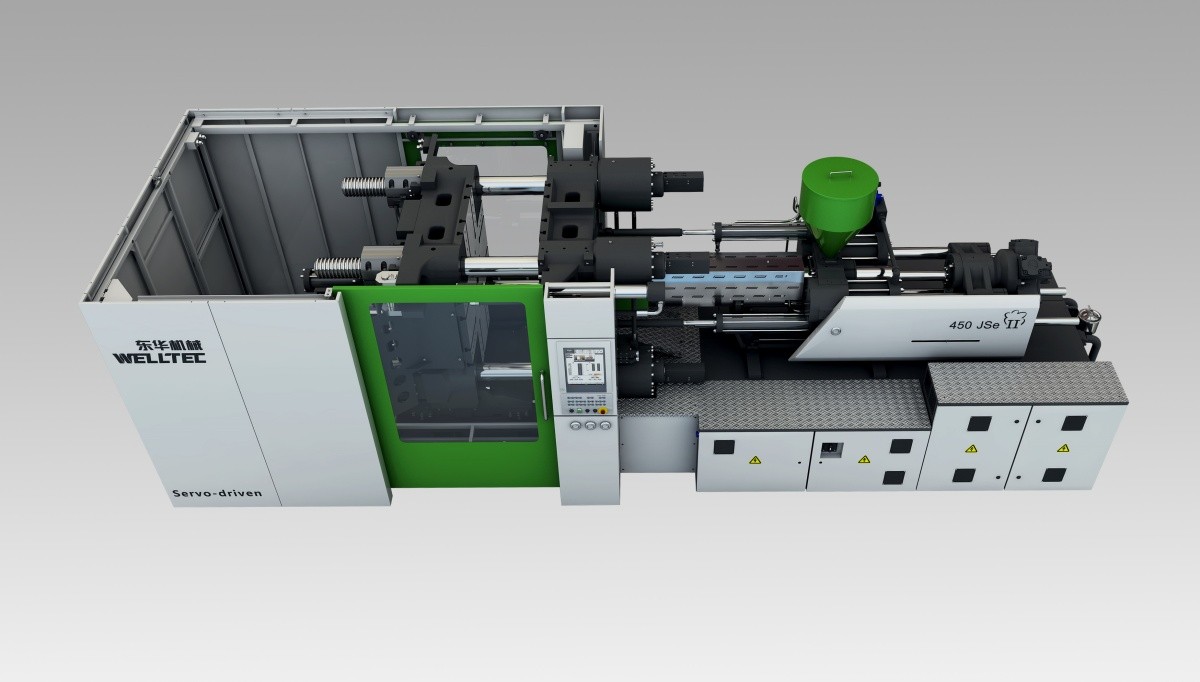
先进的两板式锁模机构,结构紧凑,占地空间更小
同步式拉杆抱闸装置,抱闸油缸具备缓冲功能
抱闸精确,无冲击
超长支撑滑脚
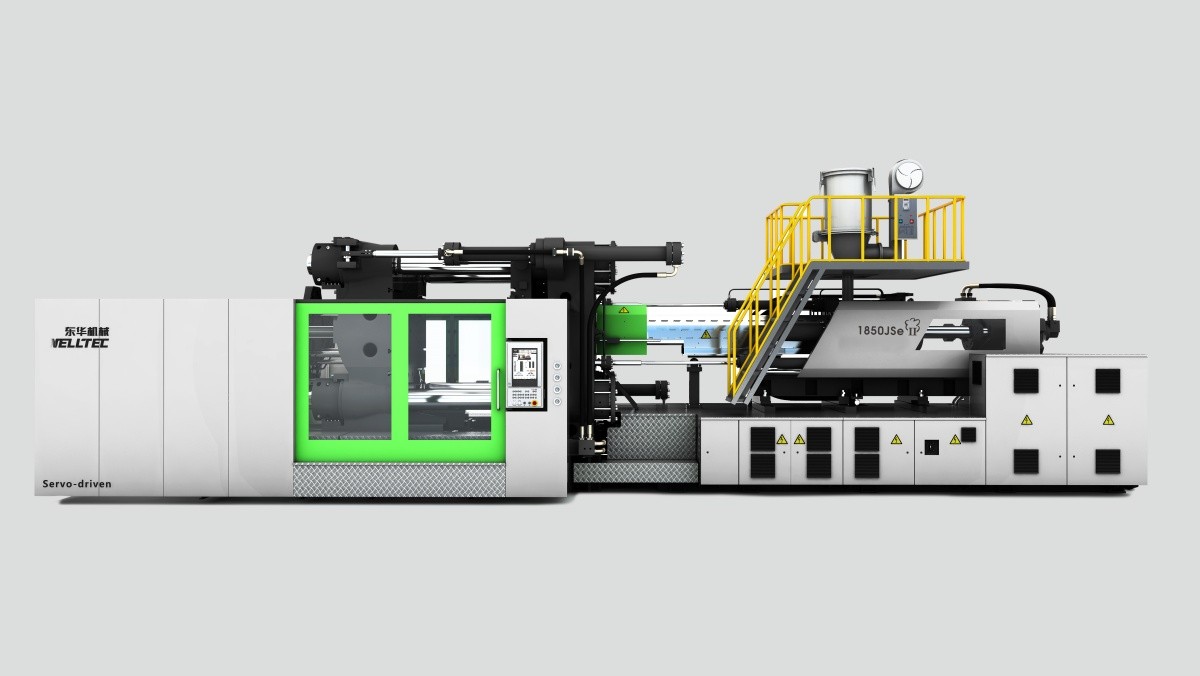
新型射台结构
结构紧凑、刚性好的新型射台结构
射台模块化设计,大小射台更换方便
双缸射移+料筒支撑,料筒防悬垂调节组件,调节简单

较传统变量泵系统机型节能30%以上
AC伺服马达实现流畅低速动作控制
液压耗能降至最低,避免油温上升
欧洲进口贝加莱专业注塑机控制系统
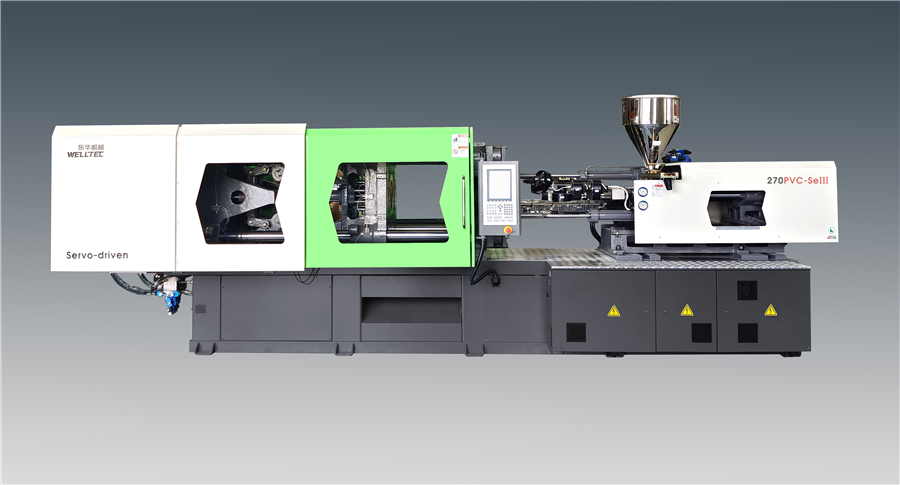
较传统变量泵系统机型节能30%以上
AC伺服马达实现流畅低速动作控制
流量及压力双闭环控制,大大提高制品重复精度
伺服驱动液压泵,低压及低流量操作表现尤其出色及稳定
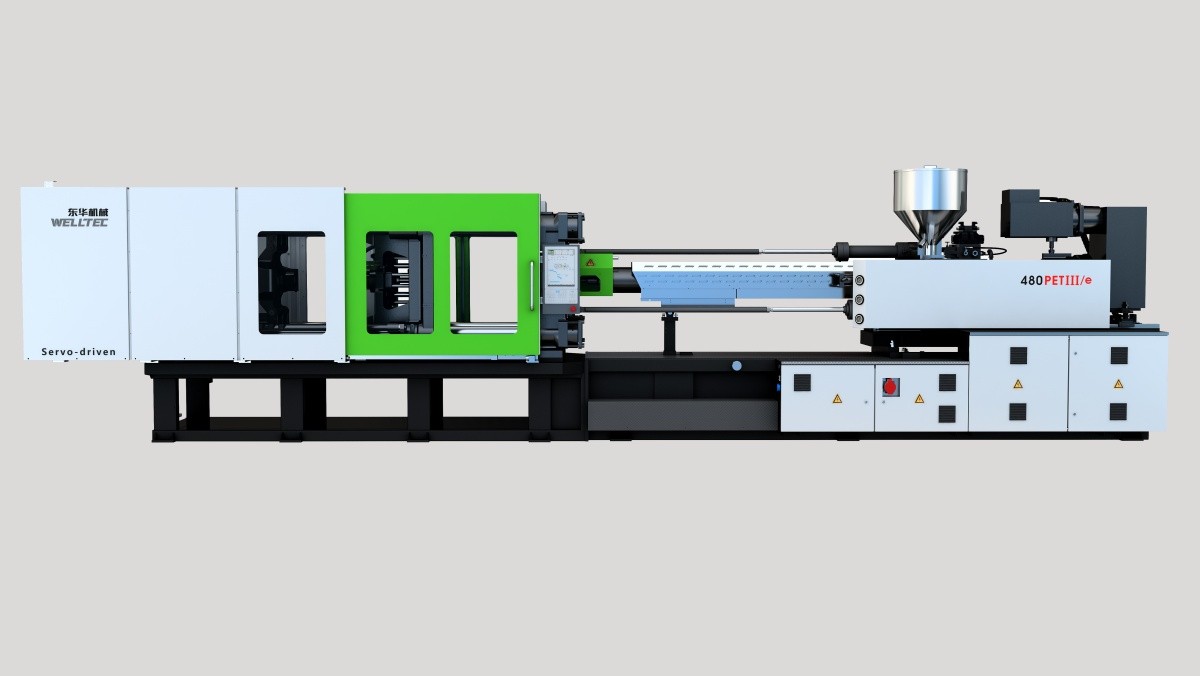
利用有限元分析软件最优化锁模设计,应力均匀,高刚性,可靠耐用;特大开模行程,满足长管胚生产
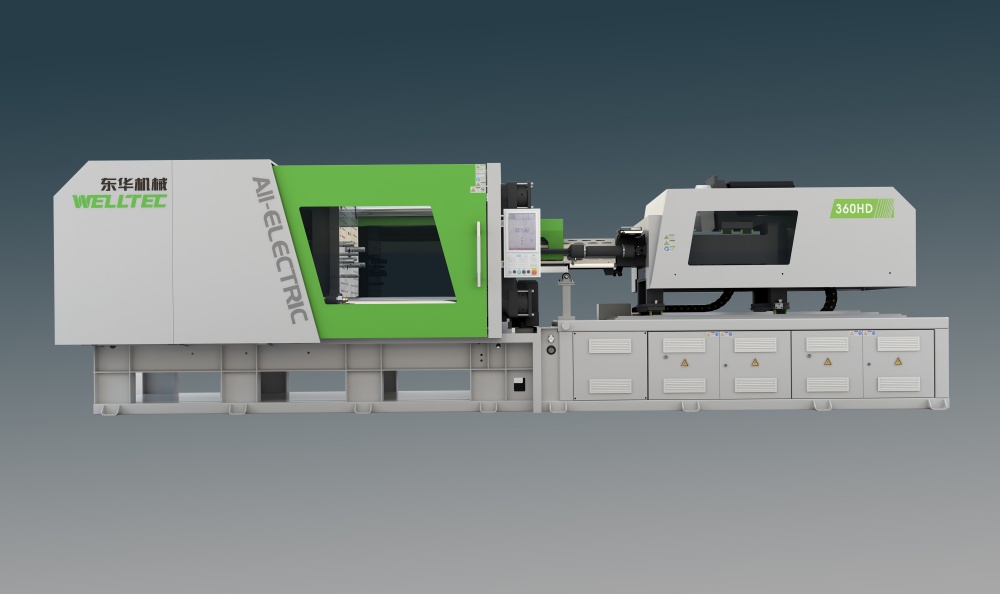
高刚度射台机构,最高压力注射机构变形≤0.05mm,能够有效保证超精密注射过程的压力实时准确监控
射胶、开合模、顶出位置重复精度±0.01mm;制品重量重复精度超过0.1%,满足精密注射要求
The biggest risk when downloading FRP tools is malware-laced files from unknown blogs. Do not download from file-hosting sites like MediaFire or user-uploaded Google Drive links unless verified.
No. FRP bypass only removes Google account verification. SIM/carrier locks require separate unlocking codes.
You should now see the main dashboard with brand logos: Samsung, Xiaomi, Huawei, Oppo, Vivo, Motorola, Nokia, LG, Realme, OnePlus, Tecno, Infinix, Itel.
If you are a technician or a power user who frequently deals with factory-reset locked Android devices, FRPFile AIO V2.5 is an indispensable addition to your toolkit. Its wide brand coverage, frequent updates, and one-click operations save hours of manual ADB commands or risky flashing.
However, always remember:
Why should you choose version 2.5 over older builds or standalone tools? Here are the standout improvements:
Note: For Xiaomi devices, you typically need to boot into Test Point Mode or EDL. FRPFile AIO V2.5 includes a dedicated "Xiaomi Auth Bypass" module.
Let's walk through a real-world bypass for a Samsung Galaxy A32 (SM-A325F) running Android 13.
Si quieres, puedo generar:
FRPFILE AIO v2.5 (and its newer versions like v2.8.6) is an "all-in-one" utility used for bypassing iCloud Activation Locks and removing FRP (Factory Reset Protection) on iOS devices. ⚠️ Security and Legal Warning
Before searching for a download, you should be aware of several critical risks: Security Hazards
: Independent analysis of these executable files often flags them for suspicious behavior
, including potential spyware strings, evasion techniques (hiding from debuggers), and unauthorized network contacts.
: Because these tools are not officially authorized by Apple, they are frequently hosted on third-party sites that may bundle them with malware or adware. Legal & Terms
: Using such tools typically violates Apple's Terms of Service and may be illegal depending on your local jurisdiction and how the device was obtained. Hybrid Analysis Features of FRPFILE AIO This tool is generally used for:
Bypassing the "Hello" activation screen on older iPhones (typically iPhone 5s through iPhone X). Removing the to gain access to the home screen. MDM (Mobile Device Management) bypass.
Fixing issues like notification errors or iMessage/FaceTime activation after a bypass. Alternatives and Recommendations
If you are looking for more reliable or safer ways to manage a locked device: Official Support
: If you have the original proof of purchase, Apple can often remove the activation lock for you through their official support portal Community Discussion
: For technical troubleshooting and safer alternative tools, the Descargar Frpfile Aio V2.5
Draft Report: Investigation into "Descargar Frpfile Aio V2.5"
Introduction
This report aims to provide an investigation into the topic of "Descargar Frpfile Aio V2.5", which appears to be related to a software tool or application. The investigation will cover the available information, potential risks, and implications associated with this topic.
Background
Frpfile AIO (All-In-One) is a software tool that seems to be designed for bypassing Factory Reset Protection (FRP) on Android devices. FRP is a security feature implemented by Google to prevent unauthorized access to devices in case they are lost or stolen. The tool's version V2.5 has been circulating online, with users searching for ways to download (Descargar) it.
Findings
Implications and Recommendations
Based on the findings, it is essential to exercise caution when dealing with Frpfile AIO V2.5 or similar tools:
Conclusion
The investigation into "Descargar Frpfile Aio V2.5" highlights the need for caution when dealing with FRP bypass tools. While these tools may seem appealing, they pose significant risks and implications. Users should be aware of these risks and consider alternative solutions to recover their devices. Manufacturers and developers should prioritize device security and provide legitimate solutions for device recovery.
Future Investigation Directions
Further investigation is recommended to:
FRPFile AIO V2.5 is a versatile all-in-one software tool designed primarily for bypassing Factory Reset Protection (FRP) and managing various mobile device functions, particularly for iOS and Android platforms. In the world of mobile repair and digital forensics, tools like FRPFile AIO have become essential for technicians and power users who need to regain access to devices where credentials have been lost or forgotten. Understanding the Context: Why Tools Like FRPFile Exist
The Factory Reset Protection (FRP) feature was introduced by Google and Apple (as Activation Lock) to prevent unauthorized access to a device after a factory reset. While this is a critical security measure against theft, it often creates a hurdle for legitimate owners who lose their account information or for second-hand buyers who receive a device that hasn't been properly signed out. This "lock" prevents the device from being set up, effectively turning it into a "brick." FRPFile AIO V2.5 was developed to address these specific scenarios by providing a suite of bypass methods. Core Features and Functionality
FRPFile AIO V2.5 is known for its multi-functional approach. Unlike tools that focus on a single brand or operating system, this version offers a wide range of capabilities:
iCloud Activation Bypass: One of its most popular uses is bypassing the iCloud Activation Lock on older iPhone and iPad models (typically those susceptible to the checkm8 exploit). It allows users to skip the login screen and access the device's home screen.
Passcode/Disabled Device Support: The tool often includes features to backup and restore activation files, allowing a user to reset a passcode-locked device without losing its ability to connect to cellular networks after the bypass.
MDM Bypass: Mobile Device Management (MDM) profiles often restrict what a user can do on a company-owned device. FRPFile AIO can remove these profiles, granting full control back to the user.
Android FRP Removal: While many associate it with iOS, it also includes utilities for Android devices, utilizing various "exploits" or ADB commands to skip the Google account verification process. The biggest risk when downloading FRP tools is
Fixing Common Errors: It includes "fixer" utilities for common issues like notification errors, iMessage/FaceTime activation problems, and banking app detection issues that often occur after a bypass. Technical Implementation
The tool operates by interacting with the device’s hardware and low-level software. For iOS devices, it typically requires the device to be in DFU (Device Firmware Update) mode or to be jailbroken using tools like Checkra1n. Once the software gains root-level access, it modifies or bypasses the setup files that check for server-side activation status.
For Android, the tool might use "Browser" methods (tricking the device into opening a web browser during setup) or direct communication via the Android Debug Bridge (ADB) to disable the setup wizard or clear the persistent data partition where the FRP flag is stored. Ethical and Security Considerations
While FRPFile AIO V2.5 is a powerful utility, it exists in a legal and ethical grey area.
Security Risks: Downloading these tools often involves disabling antivirus software, as they use exploits that are flagged as "malicious" by security programs. This opens the user up to potential malware from untrusted download sources.
Legality: The use of bypass tools may violate terms of service or local laws regarding digital rights management (DRM) and device security.
Ethical Use: It is intended for individuals who have forgotten their own credentials or for repair shops helping customers. Using it on stolen property is illegal and unethical. Conclusion
FRPFile AIO V2.5 represents the ongoing "cat-and-mouse" game between device manufacturers and independent developers. As security protocols like Apple’s Secure Enclave and Google’s Titan M chips become more sophisticated, tools like FRPFile must evolve to find new vulnerabilities. For the tech-savvy user, it is a "Swiss Army knife" for device recovery, but it must be used with caution, responsibility, and an awareness of the security risks involved.
Title: Navigating the Complexities of FRP Bypass: An Analysis of Frpfile AIO V2.5
In the modern landscape of mobile technology, security is a double-edged sword. While manufacturers implement robust protocols to protect user data, these same mechanisms can inadvertently lock legitimate owners out of their devices. One of the most significant of these security measures is Google’s Factory Reset Protection (FRP). For technicians and advanced users seeking to bypass this lock on Apple devices, tools like Frpfile AIO V2.5 have become essential utilities. Understanding what this tool is, its functionality, and the ethical considerations surrounding its use provides a window into the ongoing tug-of-war between security engineering and software circumvention.
Frpfile AIO, which stands for "All In One," is a specialized software utility designed primarily for Windows operating systems. While the name suggests a focus on FRP, the tool is widely recognized in the repair community for its ability to bypass the iCloud Activation Lock and the Hello screen on iOS devices, particularly those running iOS 15 and iOS 16. Version 2.5 represents a specific iteration of the software that improved upon previous versions by expanding compatibility with newer iPhone models and bug fixes for the "untethered" bypass method. Unlike official unlocking methods, which require the original Apple ID and password, Frpfile AIO V2.5 operates by exploiting vulnerabilities in the device’s setup process to remove the security barrier.
The technical process of using Frpfile AIO V2.5 is a stark contrast to the seamless user experience Apple intends for its customers. The procedure typically requires the user to jailbreak the device using tools like checkra1n or palera1n, which strips away the operating system's built-in protections. Once the device is in a jailbroken state, the user connects it to a computer running the Frpfile software. The tool then modifies the system files, effectively tricking the device into believing it has already been authenticated. While the process is efficient for technicians, it carries inherent risks, including the potential to "brick" the device (rendering it unusable) or voiding any remaining warranty.
However, the existence and utility of Frpfile AIO V2.5 cannot be discussed without addressing the significant ethical and legal implications. Apple’s Activation Lock is designed to deter theft; if a stolen phone cannot be used, the incentive to steal it diminishes. Tools that bypass this lock, while valuable for repairing second-hand devices where the original owner cannot be contacted, also serve as a lifeline for the black market. The availability of V2.5 creates a precarious balance: it empowers small repair businesses and helps users recover devices they legitimately own but have lost access to, yet it simultaneously undermines the security architecture designed to protect that ownership. Consequently, the software operates in a grey area of the tech industry—utilized by professionals but often scrutinized by security experts.
In conclusion, Frpfile AIO V2.5 is more than just a downloadable file; it is a symbol of the complex relationship between hardware ownership and software control. For many users, it is a vital recovery tool that solves a frustrating technical deadlock. However, its use requires a high degree of technical proficiency and a strong ethical compass. As mobile security continues to evolve, tools like Frpfile will remain a subject of debate, highlighting the enduring challenge of balancing consumer rights with the need for robust cybersecurity.
Descargar Frpfile Aio V2.5: The Ultimate Guide to iCloud and Passcode Bypass
Locked out of your iPhone? Finding yourself stuck on the iCloud activation screen or a forgotten passcode can be incredibly frustrating. Frpfile Aio V2.5 (All-in-One) is a popular, compact tool designed for technicians and DIY users to bypass these security hurdles on various iOS devices. What is Frpfile Aio V2.5?
Frpfile Aio is a specialized Windows-based software that provides a suite of tools for iCloud Bypass and Passcode removal. Version 2.5 introduced significant stability improvements, making it a "life-saver" for users dealing with locked Apple devices. Key Features
Untethered Bypass: Unlike older methods, this allows you to restart your device without losing the bypass.
Core Services Support: Enables login for Siri, iCloud, iMessage, and FaceTime. If you are a technician or a power
Passcode Fix: Offers a 100% fix for passcode-locked devices by creating file backups from other tools.
Hidden iCloud Owner: Allows you to change the password and log in with a new account even if the "Hidden iCloud" status is active. Essential Requirements
Before you begin the download and use process, ensure you have the following:
Windows PC: The tool is designed specifically for Windows environments.
Jailbreak: Most functions require your device to be jailbroken (commonly using tools like Checkra1n). Note: Version 2.5 has known issues with Checkra1n 0.12.3, so check for compatibility before starting.
Stable Connection: Use a high-quality USB cable to avoid disconnection during the sensitive bypass process. How to Use Frpfile Aio
While the exact steps may vary by device model, the general workflow remains consistent:
Jailbreak your device using a compatible version of Checkra1n. Connect your iPhone/iPad to your PC via USB. Run the Frpfile Aio tool as an administrator.
Select the desired function (e.g., "Bypass iCloud" or "Bypass Passcode").
Wait for the tool to finish the process. Your device will typically reboot once the bypass is successful. Important Safety & Security Warning
It is vital to download these tools only from the official Frpfile.com site. Third-party mirrors often bundle the software with malware or spyware.
Malware Risks: Online file analysis reports for various "AIO" executables often show high threat scores (e.g., 87/100), flagging them as potentially malicious.
Antivirus Interference: Most antivirus programs will flag bypass tools as threats. It is often necessary to temporarily disable your firewall, but only do this if you trust the source. Conclusion
Frpfile Aio V2.5 remains a powerful asset for those needing to recover access to their iOS devices. However, because it touches sensitive system files, always backup any data you can and proceed with caution.
Are you trying to bypass an iCloud lock or a Passcode? Let me know your device model and iOS version, and I can provide more specific compatibility advice.
Viewing online file analysis results for 'FRPFILE AIO v2.8.exe'
Free Automated Malware Analysis Service - powered by Falcon Sandbox - Viewing online file analysis results for 'FRPFILE AIO v2. 8. Hybrid Analysis
Viewing online file analysis results for 'FRPFILE AIO v2.8.exe'
我们的技术创新中心负责提供从25吨到4000吨范围内的标准型和专用型注塑机、配套设备及全自动解决方案

固话:0769-22806237 邮箱:sales.dg@cml.com.cn 地址:广东省东莞市东城区周屋工业区银珠路

版权所有:东华机械有限公司 ©2008-2023 备案号:粤ICP备07045576号